
In Person Markets allow you include products you want to harvest and pack for your direct sales in with the harvesting and packing you are doing for your LFM markets.
To add an In Person Market click the person icon on the top right and select Settings→Manage Markets, or use the Add Market link on the Sell page. At the bottom of the Manage Markets page is the Other Markets section where you can add an In Person Market.
You will assign the new In Person Market a market name and market day, and you can give it an address if you want to. Next you will choose the Harvest Day for the market. Finally you will choose which of your products you want to make available in this market. You can set up as many In Person Markets as you want, naming each one for each of your direct sales outlets and giving it a different market and harvest day, or you can just use one In Person Market for all of your direct sales.
Once your In Person Market is set up you can allocate products to it each week on the Sell page. Click on the name of the market to get to the list of product available to that market.
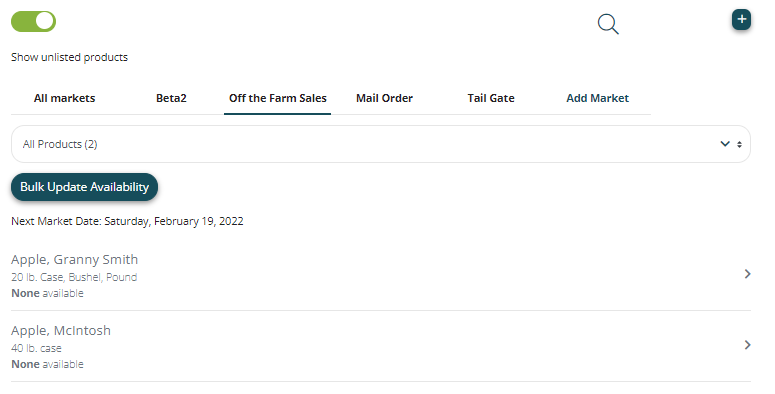
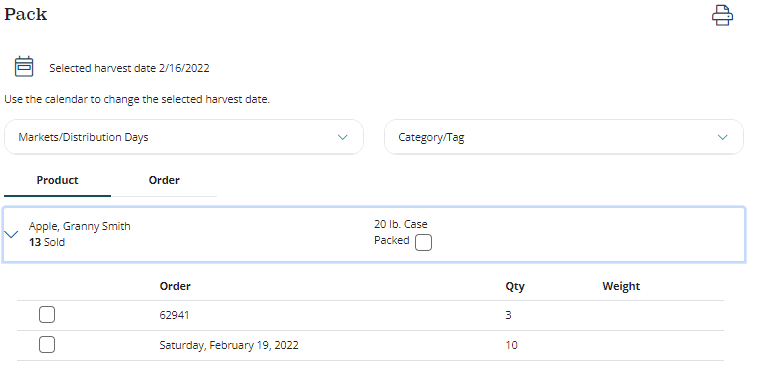
For In Person Markets, unlike LFM markets, all quantities you make available on the Sell page automatically get added in full to the Harvest and Pack pages. For example, if we want to harvest and pack ten 20lb cases of Granny Smith Apples for the in person market called "Off the Farm Sales" in the example above, we would make ten cases available prior to the harvest day of that market. Then those ten cases will appear, along with and LFM market sales, in our Harvest and Page pages and reports for that harvest day. In the example below, Order 62941 is an order from and LFM market and "Saturday, February 19, 2022" is the quantity we allocated to our in person market on the Sell page.
Comments
0 comments
Please sign in to leave a comment.